Hyundai Veloster N TC
Explore source-backed information and braking guidance for Hyundai Veloster N TC in iRacing.
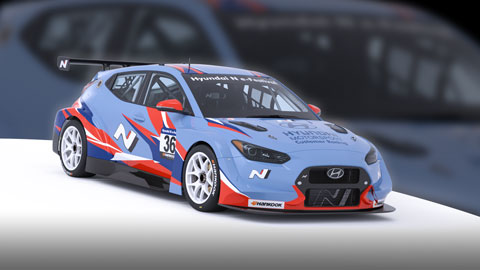
Image © iRacing.com Motorsport Simulations
Quick reference
Chassis
Power
Brakes
Setup
Advanced
How the Hyundai Veloster N TC Handles Braking
The Hyundai Veloster N TC features a sophisticated dual-adjustment brake system designed specifically for front-wheel-drive touring car dynamics. Beyond the standard brake bias adjuster, the car includes a rear brake proportioning valve that becomes critical during heavy braking. As a front-wheel-drive car with limited static rear weight, hard braking creates lightly-loaded rear tires that can lock easily. The proportioning valve limits rear brake line pressure independently, allowing you to tune low-to-medium pedal force situations with brake bias, then fine-tune heavy braking scenarios with the valve setting.
The relationship between these systems requires a methodical approach: set your brake bias adjuster first for general balance, then dial in the proportioning valve to prevent rear lockup under threshold braking. Each valve adjustment down from maximum increases effective front bias by approximately 1% during heavy braking. Lower valve settings force the fronts to do more work and will increase stopping distances, so find the lowest setting that prevents rear lockup without compromising overall braking performance.
Front camber adjustments directly impact braking characteristics—higher negative camber improves mid-corner grip but reduces longitudinal braking force, necessitating a rearward brake bias shift to compensate. The ABS system offers five settings (Dry, Damp, Wet, Safety Car, and Limp mode) adjustable via the F8 Black Box, allowing you to optimize brake modulation for changing track conditions without returning to the garage.
Stop Guessing, Start Improving
Many drivers slam the brakes with all their strength, but the fastest modulate pressure, use the brake to rotate the car, and exit as fast as possible. Train that skill here.
Train Anywhere, Anytime
Browser-based training works with any racing pedals or controllers. Fanatec, Thrustmaster, Logitech, Simucube — no installation required.
Pro-Designed Exercises
Access exercises created by professional sim racers like Suellio Almeida. Learn the exact braking patterns used by the fastest drivers.
Import Hyundai Veloster N TC Telemetry
Drop your Garage61 lap CSV and extract braking data for every corner. Generate personalized practice exercises based on YOUR telemetry, not generic patterns.
Track Your Progress
View session history, performance trends, and best scores. Watch yourself improve over time and stay motivated to practice.
And There's Much More
Improve your braking technique with this car and much more:
Create Custom Exercises
Build from templates, draw brake curves, or record with your pedal
Schedule Your Training
Plan practice sessions and track your consistency across weeks
Brake Master Ratings
Earn rankings and compete on leaderboards as you improve
Exercises & Progress Tracking
Practice exercises and track your progress completely free.
No install needed • Works in browser
General practice tips
Tip 1
Starting point
Start with the official setup and consult the simulator documentation for available controls. Appropriate brake bias depends on the car and conditions.
Tip 2
One variable
Change one setting at a time and compare several laps. Record the change and observed behavior before keeping it.
Tip 3
Comparable conditions
Compare similar fuel loads, tires and track conditions. One lap alone does not establish that a setting is better.
Frequently asked questions
General guidance for practicing and consulting car-specific sources.
Where can I find settings for the Hyundai Veloster N TC?
Where can I find settings for the Hyundai Veloster N TC?
How should I compare a setup change?
How should I compare a setup change?
How can I practice pedal control?
How can I practice pedal control?
Explore MoreOther Cars
Similar cars you might be interested in learning
Ready to Master the Hyundai Veloster N TC?
Put this knowledge into practice with Braking Lab's interactive brake training exercises. Import your telemetry and get personalized feedback.