Ferrari 296 Challenge
Explore source-backed information and braking guidance for Ferrari 296 Challenge in iRacing.
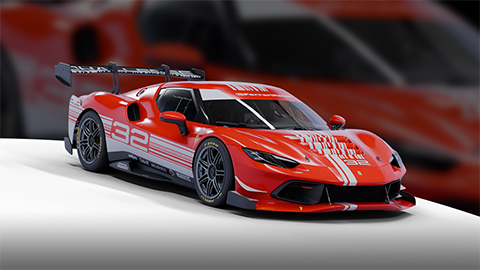
Image © iRacing.com Motorsport Simulations
Quick reference
Chassis
Power
Brakes
Setup
Advanced
How the Ferrari 296 Challenge Handles Braking
The Ferrari 296 Challenge features a sophisticated four-position ABS system that fundamentally shapes the braking experience. Settings P1-P2 are designed for dry slicks, while P3-P4 handle wet conditions. The aggressive P1 setting targets a rearward brake bias with increased yaw tolerance, actively encouraging trail-braking to rotate the car into corners. The conservative P2 reduces this rotation emphasis while maintaining lockup protection. Notably, the ABS cannot be disabled, making proper setting selection critical rather than optional.
Setup adjustments significantly impact braking performance beyond the ABS maps. Higher front camber values improve mid-corner grip but reduce straight-line braking capability—a tradeoff often worth accepting. Front toe-out increases turn-in response but compromises brake zone stability, while rear camber affects brake balance by changing rear tire loading under deceleration. These adjustments interact with the ABS system's target brake bias, creating a web of dependencies.
The selected ABS map also influences differential coast locking, brake distribution targets and allowable wheel slip. Match P1/P2 to dry tires and P3/P4 to wet tires: the manual advises against using wet ABS maps in dry conditions. Evaluate the aggressive and conservative map within the appropriate tire group rather than treating rear tire temperature as an ABS-setting instruction.
Stop Guessing, Start Improving
Many drivers slam the brakes with all their strength, but the fastest modulate pressure, use the brake to rotate the car, and exit as fast as possible. Train that skill here.
Train Anywhere, Anytime
Browser-based training works with any racing pedals or controllers. Fanatec, Thrustmaster, Logitech, Simucube — no installation required.
Pro-Designed Exercises
Access exercises created by professional sim racers like Suellio Almeida. Learn the exact braking patterns used by the fastest drivers.
Import Ferrari 296 Challenge Telemetry
Drop your Garage61 lap CSV and extract braking data for every corner. Generate personalized practice exercises based on YOUR telemetry, not generic patterns.
Track Your Progress
View session history, performance trends, and best scores. Watch yourself improve over time and stay motivated to practice.
And There's Much More
Improve your braking technique with this car and much more:
Create Custom Exercises
Build from templates, draw brake curves, or record with your pedal
Schedule Your Training
Plan practice sessions and track your consistency across weeks
Brake Master Ratings
Earn rankings and compete on leaderboards as you improve
Exercises & Progress Tracking
Practice exercises and track your progress completely free.
No install needed • Works in browser
General practice tips
Tip 1
Starting point
Start with the official setup and consult the simulator documentation for available controls. Appropriate brake bias depends on the car and conditions.
Tip 2
One variable
Change one setting at a time and compare several laps. Record the change and observed behavior before keeping it.
Tip 3
Comparable conditions
Compare similar fuel loads, tires and track conditions. One lap alone does not establish that a setting is better.
Frequently asked questions
General guidance for practicing and consulting car-specific sources.
Where can I find settings for the Ferrari 296 Challenge?
Where can I find settings for the Ferrari 296 Challenge?
How should I compare a setup change?
How should I compare a setup change?
How can I practice pedal control?
How can I practice pedal control?
Explore MoreOther Cars
Similar cars you might be interested in learning
Ready to Master the Ferrari 296 Challenge?
Put this knowledge into practice with Braking Lab's interactive brake training exercises. Import your telemetry and get personalized feedback.