NASCAR Gen4 Cup Cars
Explore source-backed information and braking guidance for NASCAR Gen4 Cup Cars in iRacing.
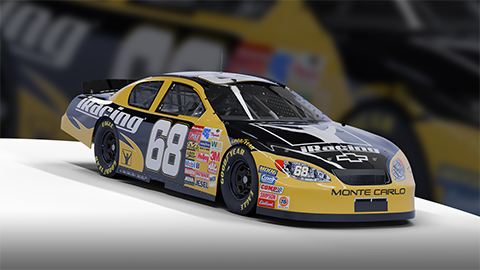
Image © iRacing.com Motorsport Simulations
Quick reference
Chassis
Power
Brakes
Setup
Advanced
How the NASCAR Gen4 Cup Cars Handles Braking
The Gen 4 NASCAR has adjustable front brake bias and a dry weight of 3,400 lb. Brake bias represents the percentage of braking force sent to the front axle: values above 50% favor the front and values below 50% favor the rear. The manual calls for tuning this control to driver preference and track conditions.
The truck arm mounts play an often-overlooked role in braking performance. Higher truck arm positions add anti-squat, reducing weight transfer under braking and helping prevent rear wheel hop—particularly important at tracks like Martinsville where heavy, repeated braking can upset the chassis. Lower mounts increase rear bite but make the car more prone to instability under threshold braking. This interaction between brake bias, weight distribution, and suspension geometry defines the Gen 4's braking character.
Driver technique must adapt to the car's high power-to-downforce ratio. At speedways like Michigan, you'll exceed 200 mph before needing to scrub 40-50 mph in a short braking zone, demanding aggressive initial brake application followed by a controlled coast phase. The key is avoiding the dreaded "push-loose" condition—insufficient braking creates mid-corner understeer, forcing late throttle application that overwhelms the rear tires and triggers a spin. Master your brake release timing, and the Gen 4 rewards precision with stable, predictable entries.
Stop Guessing, Start Improving
Many drivers slam the brakes with all their strength, but the fastest modulate pressure, use the brake to rotate the car, and exit as fast as possible. Train that skill here.
Train Anywhere, Anytime
Browser-based training works with any racing pedals or controllers. Fanatec, Thrustmaster, Logitech, Simucube — no installation required.
Pro-Designed Exercises
Access exercises created by professional sim racers like Suellio Almeida. Learn the exact braking patterns used by the fastest drivers.
Import NASCAR Gen4 Cup Cars Telemetry
Drop your Garage61 lap CSV and extract braking data for every corner. Generate personalized practice exercises based on YOUR telemetry, not generic patterns.
Track Your Progress
View session history, performance trends, and best scores. Watch yourself improve over time and stay motivated to practice.
And There's Much More
Improve your braking technique with this car and much more:
Create Custom Exercises
Build from templates, draw brake curves, or record with your pedal
Schedule Your Training
Plan practice sessions and track your consistency across weeks
Brake Master Ratings
Earn rankings and compete on leaderboards as you improve
Exercises & Progress Tracking
Practice exercises and track your progress completely free.
No install needed • Works in browser
General practice tips
Tip 1
Starting point
Start with the official setup and consult the simulator documentation for available controls. Appropriate brake bias depends on the car and conditions.
Tip 2
One variable
Change one setting at a time and compare several laps. Record the change and observed behavior before keeping it.
Tip 3
Comparable conditions
Compare similar fuel loads, tires and track conditions. One lap alone does not establish that a setting is better.
Frequently asked questions
General guidance for practicing and consulting car-specific sources.
Where can I find settings for the NASCAR Gen4 Cup Cars?
Where can I find settings for the NASCAR Gen4 Cup Cars?
How should I compare a setup change?
How should I compare a setup change?
How can I practice pedal control?
How can I practice pedal control?
Explore MoreNASCAR Cars
Similar cars you might be interested in learning
Ready to Master the NASCAR Gen4 Cup Cars?
Put this knowledge into practice with Braking Lab's interactive brake training exercises. Import your telemetry and get personalized feedback.