Gen 3 Supercars
Explore source-backed information and braking guidance for Gen 3 Supercars in iRacing.
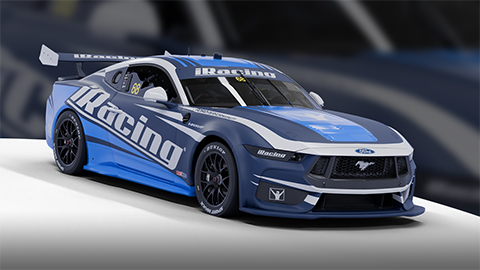
Image © iRacing.com Motorsport Simulations
Quick reference
Chassis
Power
Brakes
Setup
Advanced
How the Gen 3 Supercars Handles Braking
The Gen 3 Supercars feature adjustable brake master cylinders at both front and rear axles, providing precise control over brake line pressure and pedal feel. Larger master cylinders reduce line pressure and increase pedal effort, while smaller cylinders do the opposite. These adjustments automatically affect the brake bias percentage, which represents the proportion of braking force sent to the front wheels—values above 50% shift balance forward, increasing front lockup tendency but potentially enhancing stability.
Brake bias tuning becomes critical given the car's minimal aerodynamic downforce, which fundamentally changes weight transfer dynamics compared to previous generations. The lack of aero load means mechanical grip dominates, making brake balance highly sensitive to suspension setup changes. Increasing front camber for cornering grip will reduce longitudinal braking performance, necessitating a rearward bias shift to compensate. Similarly, shock rebound settings can influence braking stability by controlling how quickly the chassis pitches under deceleration.
The digressive front anti-roll bar offers a sophisticated approach to corner entry: it softens when the nose dips under heavy braking, reducing understeer precisely when you need turn-in response. Combined with proper trail-braking technique, this variable-rate system can transform the car's high-speed understeer into a balanced, controllable platform. Monitor the dash's colored LED lockup indicators during threshold braking—white and blue LEDs signal front wheel lockups of varying severity, while red indicates rear lockup, helping you refine your brake bias and master cylinder settings for each track's unique demands.
Stop Guessing, Start Improving
Many drivers slam the brakes with all their strength, but the fastest modulate pressure, use the brake to rotate the car, and exit as fast as possible. Train that skill here.
Train Anywhere, Anytime
Browser-based training works with any racing pedals or controllers. Fanatec, Thrustmaster, Logitech, Simucube — no installation required.
Pro-Designed Exercises
Access exercises created by professional sim racers like Suellio Almeida. Learn the exact braking patterns used by the fastest drivers.
Import Gen 3 Supercars Telemetry
Drop your Garage61 lap CSV and extract braking data for every corner. Generate personalized practice exercises based on YOUR telemetry, not generic patterns.
Track Your Progress
View session history, performance trends, and best scores. Watch yourself improve over time and stay motivated to practice.
And There's Much More
Improve your braking technique with this car and much more:
Create Custom Exercises
Build from templates, draw brake curves, or record with your pedal
Schedule Your Training
Plan practice sessions and track your consistency across weeks
Brake Master Ratings
Earn rankings and compete on leaderboards as you improve
Exercises & Progress Tracking
Practice exercises and track your progress completely free.
No install needed • Works in browser
General practice tips
Tip 1
Starting point
Start with the official setup and consult the simulator documentation for available controls. Appropriate brake bias depends on the car and conditions.
Tip 2
One variable
Change one setting at a time and compare several laps. Record the change and observed behavior before keeping it.
Tip 3
Comparable conditions
Compare similar fuel loads, tires and track conditions. One lap alone does not establish that a setting is better.
Frequently asked questions
General guidance for practicing and consulting car-specific sources.
Where can I find settings for the Gen 3 Supercars?
Where can I find settings for the Gen 3 Supercars?
How should I compare a setup change?
How should I compare a setup change?
How can I practice pedal control?
How can I practice pedal control?
Explore MoreOther Cars
Similar cars you might be interested in learning
Ready to Master the Gen 3 Supercars?
Put this knowledge into practice with Braking Lab's interactive brake training exercises. Import your telemetry and get personalized feedback.